


A day at Lake Bled
Slovenia · Saturday itinerary
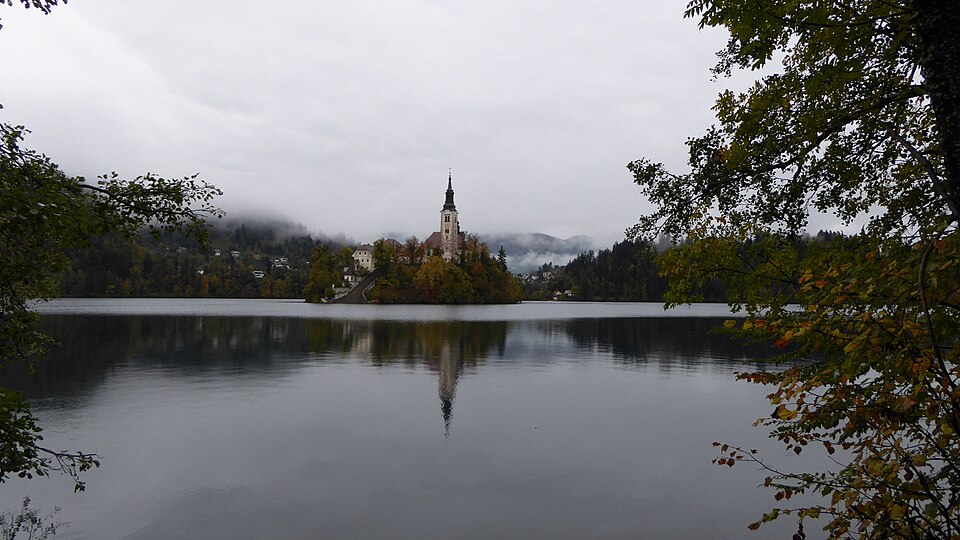
| Time | Plan |
|---|---|
| 09:00 | Walk the lakeside path |
| 11:00 | Boat to Bled Island |
| 15:00 | Cream cake by the water |
Hover or focus the logo or wordmark to select it. Drag to move; release to return. Tab and arrow keys also work.
Capture text, tables and images from your screen.
Paste them into your work.
Freefor personal use. License required for commercial use.
 Google Slides
Capture times come from the recorded examples. Actual times vary by device, image and provider.
If you can see it on your screen, you can capture it. Select content from a PDF, website, image or app. isoboard captures your screen directly, so no app or website integration is needed.
Bring your captures into the apps you already use. isoboard works with any app that accepts rich clipboard content.




















Turn a screenshot into editable content, with support for tables, images and text styling.
isOCR™ is our OCR model, built for isoboard and running on your device. Download it once and capture offline, your captures stay on your device.

Supercharge your capture using Additional Rules. Translate a passage, turn a list into a table or remove citation numbers before you paste.
Use an external AI model to apply Additional Rules.
Keep different settings, models and rules together in profiles. Save one for research, another for translations, and switch when you need to. Give frequently used profiles their own capture shortcuts.
Revisit a recent capture and make something different from it. Toggle tables, colors or images in History, preview the changes, then copy the version you need.
Slovenia · Saturday itinerary
| Time | Plan |
|---|---|
| 09:00 | Walk the lakeside path |
| 11:00 | Boat to Bled Island |
| 15:00 | Cream cake by the water |
7-day trial for commercial use included.
Free
For you, at home and for your own projects.
€50 per user
One-time payment. Taxes shown at checkout.
Buying for a team? Choose the number of seats at checkout and assign each one to a person. Read how the trial and licenses work. See the commercial terms and purchases and refunds.
isoboard’s first release is for macOS. Windows and Linux versions are planned. Exact macOS and hardware requirements will be shared with the release.
Not for local inference. You can use isOCR on your device without API tokens or usage fees. To use an external provider, connect your own API credentials or a supported sign-in. Provider charges and model access depend on your account.
With local inference, image conversion happens on your device. If you choose an external provider for conversion, the image is sent to that provider. You can also convert locally and use a provider for a separate Additional Rules pass: only the extracted text and sanitized HTML go to that provider. Choose local models for both stages to keep the whole workflow on-device.
Yes, for local processing once the required models have been downloaded. Initial model downloads need an internet connection. External providers need a connection to their service.
isoboard supports OpenAI, Anthropic, Gemini, and OpenAI-compatible endpoints, alongside local models. Available models and capabilities depend on the provider and your account.
Yes. Additional Rules let you request translation, reformatting, and other transformations with a suitable model. isOCR is designed for extraction; pair it with a text-capable model in a separate rules pass for those transformations. Save the combination as a Processing Profile to reuse it.
Almost. isoboard needs Screen Recording permission on macOS. Some apps and protected content, such as streaming video, block screen capture and appear blank, so isoboard cannot read them.
Paste into apps that accept rich HTML clipboard content, such as Word, Google Docs, and Notion. isoboard also includes a plain-text fallback. The formatting that appears depends on what the destination app supports.
History is stored locally and can include extracted content, results, and a small source thumbnail. It does not retain the original screenshot. You can restore previous results to the clipboard or delete entries from history.